Add one lead portrait, optionally add up to five separate background-friend photos, and choose original or AI-generated music. Sign in, confirm photo permission and pay $5.99 once before generation. The current offer creates one 14-second native 768P video that you can review, download and optionally share.
The photo, reference and actual result
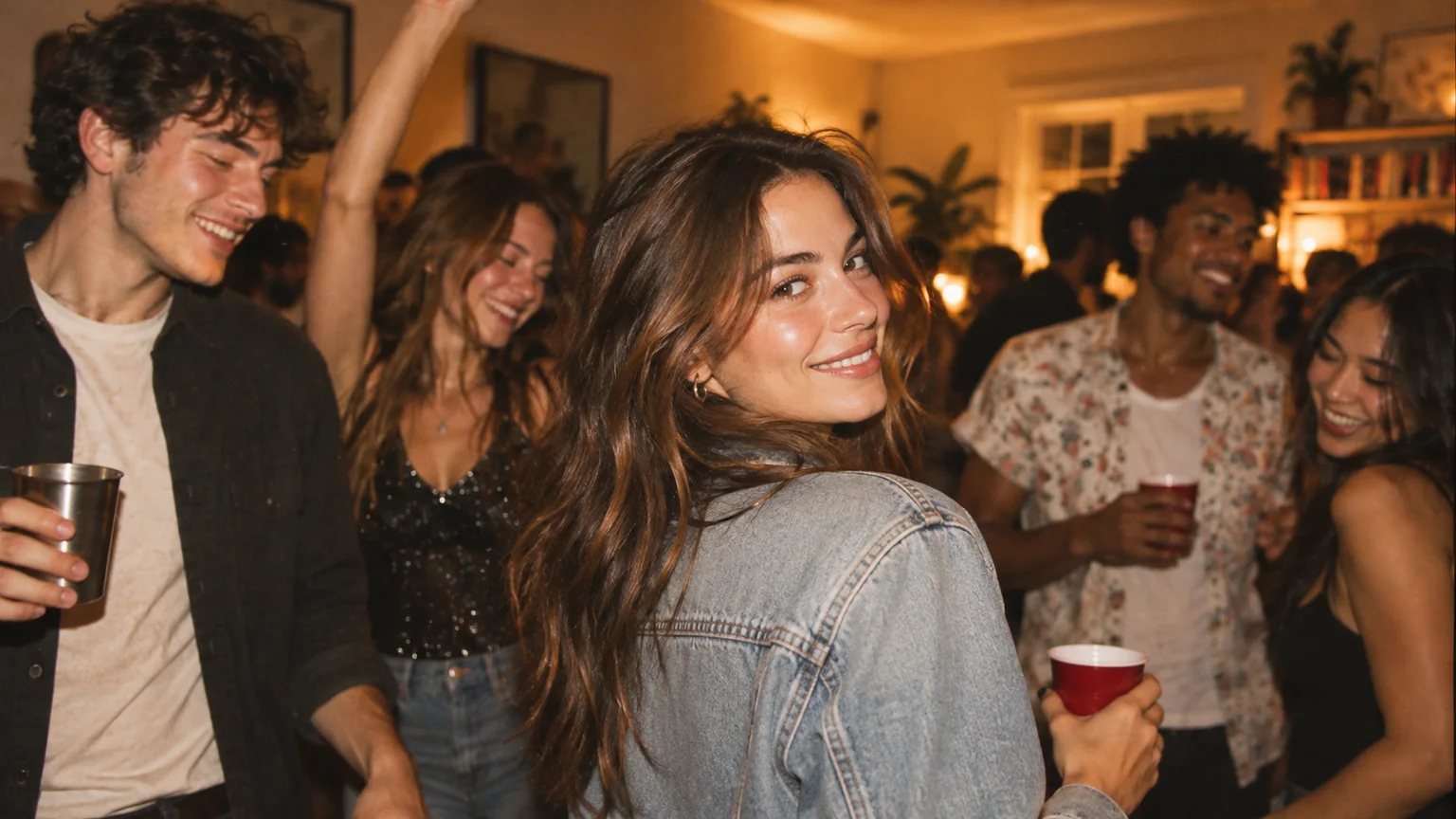
This example was generated in one direct MiniMax H3 studio test on October 12, 2026. The exact fictional-adult input photo, reference performance and completed native output are shown together. It is a studio demonstration, not a paid customer testimonial.
The request was for 14 seconds at native 768P; the returned file runs 14.375 seconds at 1344 × 768 because of native provider padding. The foreground performer changes while the broad room, camera progression and gestures remain recognizable. Fingers and lip movements differ. This one lead-replacement example does not establish added-friend fidelity or successful charged fulfillment.
Actual generation · October 12, 2026
One photo. A new lead.
A completed studio test using the exact photo below and the original performance reference. The person in the input image is fictional.
- Video request
- 14 seconds · native 768P
- Actual output file
- 14.375 seconds · 1344 × 768
- Model / attempts
- MiniMax H3 · one generation
One-time price per generation. Prepare a cast for free, then pay before creating your video. View current pricing.
The original
Reference performance · 14 seconds · 1024 × 576
View original sourceA new main character
Actual H3 output · 14.375 seconds · native 1344 × 768
Choose a music style when creating your own video.
Download this exampleThe generated preview starts with the model’s own audio. “Original music” plays a separately prepared demo with the reference audio; new orders let you choose original or AI-generated music. Both demo versions keep the same native video frames.
This test used a party image with other people in the background. For your own lead, a clear single-person portrait is a better starting point.
Follow the same photo-to-video workflow
- Add your lead photo
- Choose music and review the price
- Pay, then create
- Watch, download and share
Choose your lead and optional friends
Open Create and add one clear lead photo. Leave the friend slots empty for a solo video, or add up to five separate portraits for background roles.
- JPG, PNG or WebP; up to 10 MB per photo and 20 MB for the cast.
- 256–5760 pixels per side; one visible person per portrait.
- Selecting photos and saving a cast keep them on this device until you submit.
Review the video and music settings
The current offer is one 14-second video at native 768P for $5.99. Choose Original soundtrack to keep the reference music, or AI-generated: Auto, Hip-hop, Pop, Electronic or Cinematic. The configured performance reference guides the scene.
- Friends are supporting background roles; the lead stays in front.
- Your original or AI-generated soundtrack choice is saved with your order and included in the video you watch, download or share.
- Save cast is free and does not create a video.
Sign in, confirm permission and pay once
Use Sign in with Google, confirm “I have permission to use these photos,” then select Continue to payment. Submission uploads the cast privately and saves an order before opening Stripe Checkout. Review the price there before paying.
- One-time payment for one generation; no subscription or credit pack.
- Keep the same browser and device for the return to the studio.
- Payment is required before personalized video generation.
Return to the studio and create your paid video
After Checkout, the studio restores your cast and checks the payment. Confirm photo permission again if asked. When the order is paid, select Create paid video. Wait for the queued or processing state to finish.
- Use Check payment status if the order is still pending.
- A saved draft or successful payment is not a finished video.
- If delivery fails or needs review, keep the order reference and contact support before paying again. Generation time varies; no fixed wait is promised.
Watch the whole clip and download it
When the completed player appears, watch the full video with sound. Check the face, hands, clothing, background people and movement, then select Download video to save the MP4.
- The example requested 14 seconds; its native file runs 14.375 seconds because of provider padding.
- Review the actual output before posting; AI details can change.
- Keep a local copy. No automatic deletion schedule or indefinite storage promise is published.
If something does not go as expected
If a photo is rejected, check its real file type, dimensions and the 20 MB total cast limit, or export a fresh JPG or PNG. If Checkout is cancelled or expired, check the existing order state before starting another purchase.
After paying, restore the cast from My studio in the same browser, sign in with the same account and use Check payment status. For a failed generation, missing result or order needing review, contact support with the order reference. Refund requests are reviewed individually; do not pay again to diagnose an existing order.
A FEW MORE DETAILS
Common questions.
Do I need to write an AI prompt?
No. The studio uses its configured Burning Bridges performance reference. You supply the lead, optional friend portraits and music choice through the casting controls.
Can I make a personalized video for free?
You can prepare and save a cast on this device for free. A personalized generation costs $5.99 once, paid before creation. Saving a draft does not generate or upload a video.
Is the example a real customer order?
It is an actual generated result from a disclosed direct studio test with a fictional adult. It is not a customer testimonial, a multi-friend demonstration or evidence of charged checkout fulfillment.
READY WHEN YOU ARE.
Make your entrance.
Choose your photos and music. Review the price before creating.
Need help with an existing order? Contact support with your order reference.